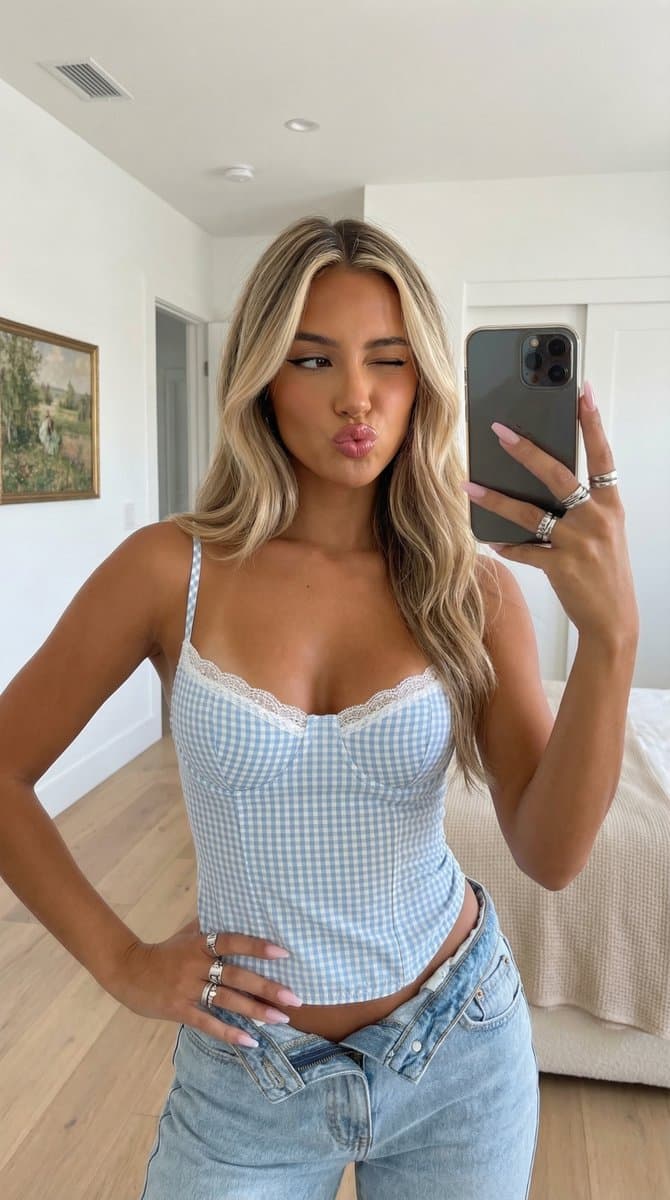
Featured Cases
Browse featured cases and choose whether to fill the prompt only or apply the prompt with model settings.

prompt: Photorealistic, casual indoor self-portrait, mid-length half-length shot at eye level, soft bright diffuse frontal natural light casting soft shadows behind the subject, with an overall naturally beautiful, camera-ready, and approachable selfie mood. Young adult woman with a warm golden-copper sun-kissed complexion and smooth, translucent skin. Thick long blond hair with dark brown roots (balaya day/ombre dye), parted in the middle, fluffy wavy hair hanging down over the shoulders, soft hair framing the face. Oval face with soft jawline. One eye is open and looking directly into the camera (dark brown or hazel), while the other eye is playfully closed and winking. The upper eyelids have black winged eyeliner and dark mascara, and the brows are defined and softly arched in medium brown. The nose is slender and straight, with subtle highlights and shadows. Cheekbones were chiseled, and the apples of her cheeks were painted with a warm rosy peach blush. The plump, rose-pink glossy lips were pursed in a distinctly kissy "duck face" expression. The overall expression is playful, confident, charming, and especially photogenic. She wore a figure-hugging light blue and white plaid bustier-style halter top with a sweetheart neckline, structured underwired cup seams, thick tonal straps, and delicate white scalloped lace at the neckline and hem. The lower body is light-washed jeans with a mid-low waist, the metal buttons at the top are unbuttoned, and the waistband is slightly open. Place your hands lightly on your waist/hips and rest your fingers splayed on your ribs. There are multiple stacked silver rings on her right hand. Long almond shaped acrylic manicure with light pink/nude polish. Background: modern bright interior room (bedroom). Sleek white walls and light oak floors. An idyllic painting of green fields hangs on the left wall, and a corner of the bed reveals white sheets and a beige/cream textured blanket. To the right is a partially visible dark doorframe or open door, and a woven wicker/rattan floor basket. The ceiling includes a rectangular white HVAC vent and a round white smoke detector or light fixture. Photorealistic, high-detail, natural interior portrait with a pretty, camera-ready, effortlessly charming subject.
Creator showcase
See how creators use Kovvid AI for product visuals, ad creatives, and short-form videos.
Compare 6 AI image and video models in one workspace
Use Kovvid AI to compare Sora 2, Veo 3, Kling AI, Nano Banana 2, Nano Banana Pro, and Seedream 4.5 side by side for image generation, video generation, image-to-video, and first-to-last-frame workflows.
Key features of the Nano Banana Pro AI image generator
If you need a free AI image generator for commercial design, clear layout, and 4K-ready visuals, Nano Banana Pro is worth testing first.
Nano Banana Pro for layout-heavy images
It works especially well for banners, posters, social cards, and product page headers where both text and structure need to stay clear. Compared with mood-first image models, Nano Banana Pro fits marketing and ecommerce work better.
Nano Banana Pro for 4K-ready drafts
It is a strong fit for ad creatives, brand key visuals, and campaign headers that need higher-resolution output. Start with a clean first draft in Nano Banana Pro, then refine it for your final 4K deliverable.
Nano Banana Pro for iterative edits
You do not need a perfect prompt on the first try. Start with the subject, layout, background, and tone, then refine spacing, hierarchy, composition, and key elements one step at a time.
Nano Banana Pro for reference-based edits
It is useful not only for generating from scratch, but also for updating existing product images, mockups, and design drafts. In many cases, you can change the background, structure, or style without rebuilding the whole image.
Nano Banana Pro for brand consistency
When one visual system needs to stretch across multiple sizes and channels, Nano Banana Pro helps you keep the same structure and style. Start with one strong direction, then extend it into posters, banners, and social assets.
Nano Banana Pro for ecommerce creatives
Ecommerce teams often need feature graphics, comparison cards, promo visuals, and explainer images. Nano Banana Pro is a good fit for this kind of work because the information needs to be easy to scan and easy to compare.
Nano Banana Pro for reusable templates
When you find a structure that works, save it. Reusing proven rules for headlines, product placement, and selling points makes the next campaign faster and more consistent.
Try Nano Banana Pro free before you commit
Most teams care less about novelty and more about whether the output is usable. Kovvid AI lets you test Nano Banana Pro with real prompts and real layouts before you decide how deeply to use it.
How to use the Nano Banana Pro AI image generator
For ads, ecommerce graphics, and brand visuals, Nano Banana Pro works best as a four-step workflow: define the goal, write a layout-first prompt, refine one part at a time, and save the winning structure.
Define what the Nano Banana Pro image needs to do
Before you start, decide whether you are making a poster, banner, product page image, or social visual. The clearer the job, the easier it is to write a stable prompt.
Write a layout-first prompt
Start with where the subject goes, where the headline goes, what the background should look like, and what tone or color palette you want. Nano Banana Pro responds well when the structure is clear up front.
Compare results and refine one part at a time
Once you have a first draft, do not restart too quickly. Keep what is already working, then adjust headline placement, spacing, product size, or background density one change at a time.
Save strong Nano Banana Pro templates
When you land on a structure that works, save it. Later, you can swap products, offers, or channels without rebuilding the whole prompt from scratch.
Nano Banana Pro works best when you build the structure first and fine-tune the details after. That gives you more stable results and better reusable templates.
What do teams gain most from Nano Banana Pro?
It is built for usable images, not just attractive images. The value shows up when speed, clarity, and repeatable structure matter.
On Kovvid AI, marketing teams can sketch ad layouts faster, ecommerce teams can test product page creatives earlier, and brand teams can scale one visual direction across more sizes and formats. For most teams, Nano Banana Pro shortens the path from idea to first draft.
Start Nano Banana ProMulti-use
Works across ads, ecommerce, and brand design
4 steps
Simple workflow to get started
8 items
Core capabilities on one page
Ad layout testing for marketing teams
Marketing teams often need to compare selling points, headlines, and layout directions fast. Nano Banana Pro makes it easier to generate several structured options without starting from a blank canvas.
Faster product page visuals for ecommerce teams
Ecommerce teams deal with constant creative changes. Nano Banana Pro helps you test feature sections, product placement, and information hierarchy faster, which is useful when asset demand keeps moving.
Faster first drafts for designers
Designers do not need Nano Banana Pro to replace design software. They use it to get to a strong structural draft faster, then spend more time refining the parts that matter.
More output for small teams
For lean teams, Nano Banana Pro can raise output without adding headcount. Even without a full design team, you can still get structured, usable first versions quickly.
Nano Banana Pro FAQ
Here are the most common questions about Nano Banana Pro and how teams use it in real projects.


